A Magic Station transforms eligible items into their enhanced versions.
Hand in the items along with gold, wait for processing, and receive everything already enhanced.
Overview
- Input: items + 2,500 gp per item.
- Processing: 18 seconds per item.
- Collection: in batches of 100 items while the station is working; the remainder when the crafting finishes.
- Output: items in the enhanced version.
Bonuses by category
-
Area: +5% (Avalanche, Thunderstorm, Stone Shower, Great Fireball, Explosion)
- Target: +20% (Sudden Death)
- Ammo: +5% (Diamond Arrow, Spectral Bolt)
- Healing: +10% (Ultimate Healing)
-
Potions: +10% (Supreme Health Potion, Great Mana Potion, Ultimate Mana Potion, Ultimate Spirit Potion)
-
Condition Potions: +1 to its effect and +5 minutes of duration (Berserk Potion, Bullseye, Mastermind Potion)
Examples of eligible items and their enhanced versions
- avalanche rune → enhanced avalanche rune
- explosion rune → enhanced explosion rune
- sudden death rune → enhanced sudden death rune
- diamond arrow → enhanced diamond arrow
- supreme health potion → enhanced supreme health potion
- berserk potion → enhanced berserk potion
Machine states
How to use
-
Load the machine with Flask of Extra Greasy Oil. Up to 3 may be required.
-
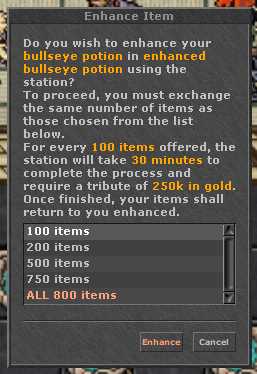
Start the enhancement and choose the quantity. Click on the loaded machine and select an item.
(Image on the right)
- Pay the cost and wait for the crafting time.
- Use the station while it is running to follow the progress and see how much time is left.
- Only the owner can collect the items: in batches of 100 during the crafting, and whatever is left when it finishes.
Partial collection
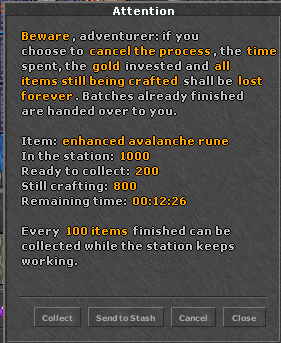
- Every 100 items finished can be collected by the owner while the station keeps working, using Collect or Send to Stash.
- Whatever does not complete a batch of 100 is only released when the crafting finishes.
- Collecting does not change the time the crafting finishes.
- A finished station hands over only what has not been collected yet, and the Crafting Complete notification shows that amount.
Running station window
When you use a station that is running, the window shows:
- In the station: everything you have not collected yet (finished + still in production).
- Ready to collect: finished batches you can take right now.
- Still crafting: items that are still in production.
- Remaining time: time left until the whole crafting finishes.
No room or capacity
Collect never fails: if your backpack has no free slots for all the stacks or you do not have enough capacity, the items go to your stash and a message tells you so. This also applies to the final collection.
Cancelling
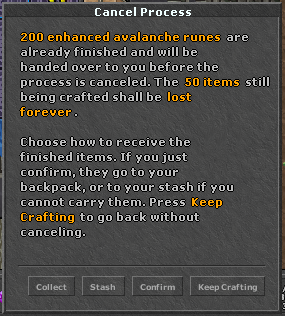
- Cancel never cancels right away: it always opens a second window asking for confirmation.
- No batch ready: Yes cancels, Keep Crafting goes back.
- With a batch ready: Collect, Stash and Confirm hand over the finished batches and then cancel (Stash sends them to the stash; the other two to the backpack, or to the stash if you cannot carry them). Keep Crafting goes back without cancelling.
- Cancelling loses the items still in production, the time already spent and the gold invested.
- A crafting that is already complete cannot be cancelled, so finished items are not wiped: just collect them.
- In the running station window, Enter and Esc now close the window instead of cancelling.
Examples of runes with enhanced versions
Examples of potions with enhanced versions
Examples of ammunition with enhanced versions
Examples of a finished station




 Top Beast Scroll
 Top Outfits